If you run WordPress — one site or a hundred — this is the week to stop reading and start checking. A pre-authentication remote code execution flaw nicknamed wp2shell landed in WordPress core, and within hours of the details going public, automated scanners were spraying the internet looking for anything still unpatched. No login required, no vulnerable plugin required, no special configuration. A default install on an affected version can be taken over by an anonymous HTTP request.
This is a walkthrough of exactly how we responded across the WordPress sites we host and manage — the emergency edge blocks for both nginx and Apache, how to hunt for a webshell if you think something got through, and how to audit every WordPress database on a shared box in one pass to catch a rogue administrator account. Copy what’s useful. It’s all here for a reason.
What wp2shell actually is
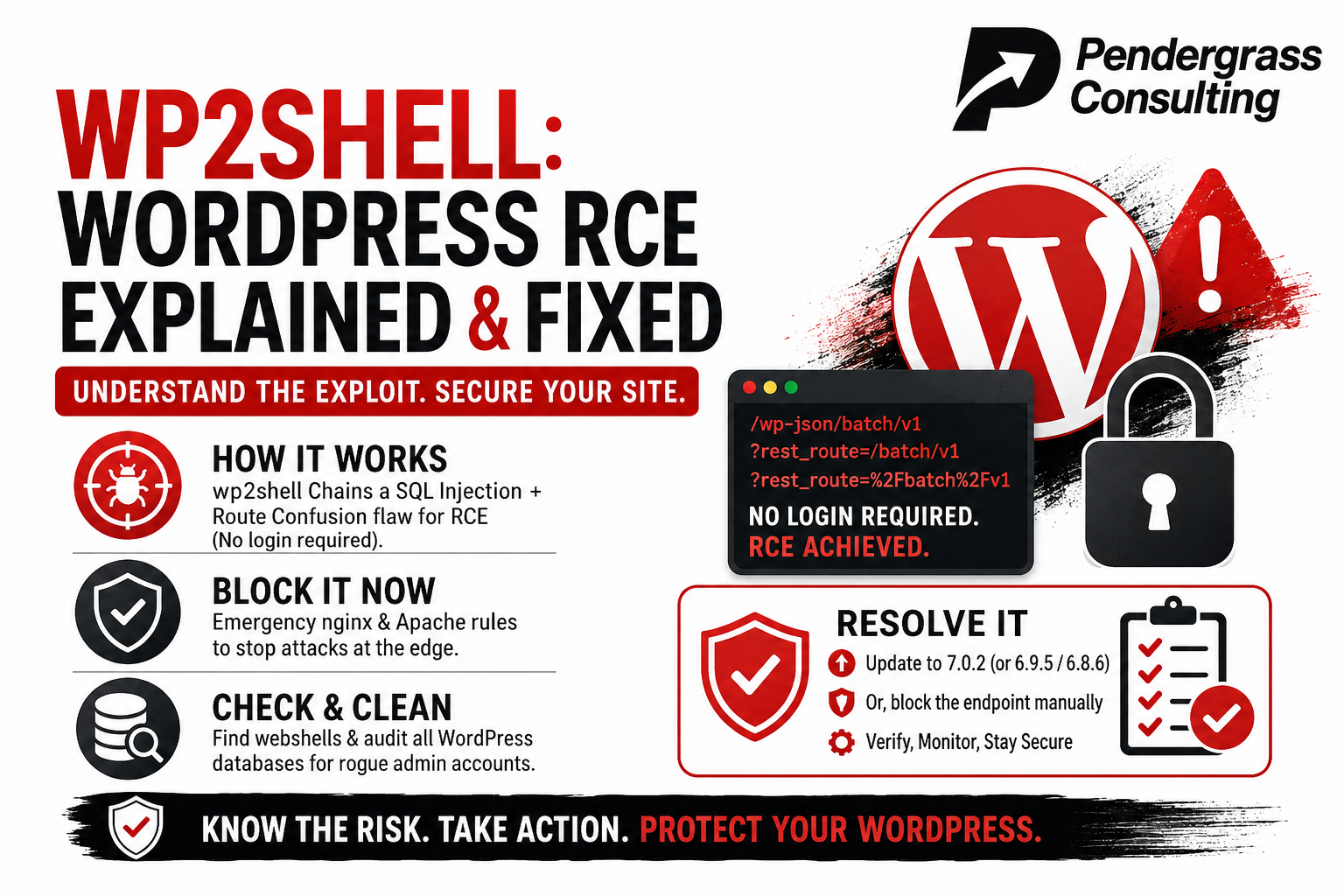
wp2shell is really two vulnerabilities chained together. The first is a SQL injection in a core query parameter that reaches back to WordPress 6.8. On its own it’s a data-exposure problem — serious, but bounded. The second is a route-confusion bug in the REST API’s batch endpoint (/wp-json/batch/v1), which lets an unauthenticated request slip past the endpoint’s own allow-list and land attacker-controlled input in that vulnerable query. Together, they turn “an anonymous stranger” into “code running on your server.”
The fix shipped on July 17, 2026. If you take nothing else from this post: update to 7.0.2, or the backported 6.9.5 if you’re on the 6.9 branch, or 6.8.6 on the 6.8 branch. The RCE chain affects 6.9 through 7.0.1. Versions below 6.9 aren’t exposed to the RCE, though 6.8 still needs 6.8.6 for the separate injection issue.
WordPress.org enabled forced automatic updates for affected versions, so many sites already have the patch. But forced updates can and do silently fail — we found two sites that showed auto-update enabled and still hadn’t taken the release. Never assume. Verify the version on disk. More on that below.
Step one: block the endpoint at the web server
Patching is the fix. Everything in this section is a stopgap — a way to buy time while you confirm every site is actually on a safe version, and a durable extra layer for any site that genuinely can’t be upgraded yet. The whole attack reaches WordPress through one endpoint in one of two URL forms, so you block both forms at the edge.
There’s a subtlety most of the copy-paste snippets going around get wrong, and it’s worth understanding rather than just pasting. The batch route can be reached two ways: the pretty path /wp-json/batch/v1, and the query-string form ?rest_route=/batch/v1. A naive rule blocks the literal /batch/v1 string — but your web server and PHP don’t decode URLs the same way. PHP url-decodes the rest_route value before WordPress routes on it, so an attacker can send %2F in place of the slashes (?rest_route=%2Fbatch%2Fv1) and sail straight past a rule that only matches /. You have to match the encoded form too.
nginx
Save this as a snippet and include it in each server {} block:
# wp2shell (CVE-2026-63030) mitigation - block REST batch endpoint
location ~* ^/wp-json/batch/v1/?$ { return 403; }
if ($args ~* "(^|&)rest_route=(/|%2F)batch(/|%2F)v1") { return 403; }
Add include snippets/wp2shell-block.conf; inside the relevant server blocks, then test and reload:
sudo nginx -t && sudo systemctl reload nginx
The regex location takes precedence over your prefix location /, and a server-level if with a bare return is one of the safe uses of if in nginx, so this drops into a standard WordPress config without reordering anything.
Apache (.htaccess)
The path rule in Apache is fine as-is — with the default AllowEncodedSlashes Off, an encoded slash in the path gets rejected before rewrite rules even run. The hole is in the query-string rule, for the same decode-mismatch reason as nginx. Here’s the corrected block:
# wp2shell (CVE-2026-63030) mitigation
<IfModule mod_rewrite.c>
RewriteEngine On
RewriteRule ^wp-json/batch/v1/?$ - [F,NC,L]
RewriteCond %{QUERY_STRING} (^|&)rest_route=(/|%2F)batch(/|%2F)v1 [NC]
RewriteRule ^ - [F,L]
</IfModule>
%{QUERY_STRING} in mod_rewrite is the raw, undecoded query string, so covering %2F case-insensitively closes the bypass. (Double-encoding like %252F doesn’t help an attacker — PHP only decodes once.)
Verify the block actually works
Deploying a config isn’t the same as loading it. After you reload, test every site — and test the bypass form specifically. All three of these should return 403:
curl -so /dev/null -w '%{http_code}n' https://example.com/wp-json/batch/v1
curl -so /dev/null -w '%{http_code}n' 'https://example.com/?rest_route=/batch/v1'
curl -so /dev/null -w '%{http_code}n' 'https://example.com/?rest_route=%2Fbatch%2Fv1'
That third line is the whole point. If it doesn’t come back 403, your regex is missing the encoded-slash bypass and the block is theater.
One important note to head off confusion: after patching, the batch endpoint still exists and still responds — it’s legitimate core functionality. A 200 or 207 on a clean request to a patched site is expected and does not mean you’re exposed. These curl tests confirm your block is working, not whether you’re patched. The version check is what confirms the patch.
The stronger layer: an app-level block
Edge blocking is inherently a little fragile — the %2F bypass is proof that the web server and WordPress can normalize a URL differently, and there may be other encoding tricks. For any site you genuinely can’t upgrade right now, an application-layer block is the sturdier control because it runs after WordPress has resolved the route, gating on the same decoded value the dispatcher will use. Drop this in as a must-use plugin (wp-content/mu-plugins/wp2shell-block.php — mu-plugins auto-load with no activation step):
<?php
/**
 * Plugin Name: wp2shell mitigation - require auth for REST batch (CVE-2026-63030)
 */
defined( 'ABSPATH' ) || exit;
add_filter( 'rest_pre_dispatch', function ( $result, $server, $request ) {
    if ( null === $result && ! is_user_logged_in()
        && 0 === strpos( $request->get_route(), '/batch/v1' ) ) {
        return new WP_Error( 'rest_forbidden', 'Authentication required.', array( 'status' => 401 ) );
    }
    return $result;
}, 0, 3 );
Unlike the web-server rule, this only blocks anonymous batch requests, so it’s gentler on any legitimate authenticated REST integrations you might run.
Step two: verify the version on disk (don’t trust the dashboard)
The authoritative source of truth is wp-includes/version.php on disk — not the admin dashboard, not the auto-update setting, not an assumption. If you host multiple sites under a common web root, one loop checks them all:
for f in /var/www/html/*/wp-includes/version.php; do
  printf '%s => ' "${f%/wp-includes/version.php}"
  grep -m1 'wp_version =' "$f" | sed -E "s/.*'([^']+)'.*/1/"
done
Anything reading 7.0.2, 6.9.5, or 6.8.6 is patched. Anything in the 6.9.0–6.9.4 or 6.8.0–6.8.5 range is unpatched and needs to move now.
If auto-update failed on a site and you don’t have WP-CLI handy, you can overlay core manually — this replaces wp-admin and wp-includes and the root PHP files while leaving wp-content and wp-config.php untouched. Back up first.
cd /tmp && wget -q https://wordpress.org/latest.zip && unzip -oq latest.zip
d=/var/www/html/SITE
tar czf /root/SITE-pre-update-$(date +%F).tar.gz -C "$d" .
rsync -a --delete /tmp/wordpress/wp-admin/    "$d/wp-admin/"
rsync -a --delete /tmp/wordpress/wp-includes/ "$d/wp-includes/"
rsync -a          /tmp/wordpress/*.php        "$d/"
chown -R www-data:www-data "$d"
Then load https://SITE/wp-admin/upgrade.php in a browser to run the database schema upgrade — overlaying files patches the code, but the DB schema revision won’t update until this runs (or until an admin next logs in). Re-run the version loop afterward to confirm.
Step three: hunt for what may have already gotten in
Here’s the part that’s easy to skip and shouldn’t be: patching stops future exploitation. It does not evict an attacker who already got in. The exploit was public and scanning was active, so any site that ran a vulnerable version during that window needs a look, regardless of its version now.
Look for uploaded PHP
An uploaded webshell is the classic post-RCE persistence trick, and the uploads directory is where it usually lands — a legitimate WordPress upload folder should never contain executable PHP.
find /var/www/html/*/wp-content/uploads -name '*.php' 2>/dev/null
Don’t panic at the first hits, though. A lot of plugins legitimately drop a tiny index.php “guard” file into their upload subfolders to block directory listing — you’ll see them under paths like uploads/wpforms/cache/ or uploads/cfdb7_uploads/. These are benign: they’re empty, a bare <?php tag, a // Silence is golden. comment, or a couple of lines that send a 404 header. Read any hit before reacting:
for f in $(find /var/www/html/SITE/wp-content/uploads -name '*.php'); do
  echo "=== $f ($(stat -c%s "$f") bytes) ==="; cat "$f"; echo
done
A real webshell looks nothing like a guard file. Watch for eval(, base64_decode(, gzinflate(, str_rot13(, assert(, or direct handling of $_POST / $_GET / $_REQUEST. A quick pass:
grep -rlE 'eval(|base64_decode(|gzinflate(|str_rot13(|$_(POST|GET|REQUEST)['
  /var/www/html/SITE/wp-content/uploads 2>/dev/null
Look for files changed during the attack window
Anything in wp-content modified in the exploitation window (roughly the CVE’s public date onward) that you didn’t put there is worth explaining. Adjust the dates to your situation:
find /var/www/html/SITE/wp-content -type f
  -newermt '2026-07-17' ! -newermt '2026-07-20' 2>/dev/null
Also glance at the auto-loaded code paths where persistence likes to hide: wp-content/mu-plugins/ and any *-drop-in.php in wp-content.
Step four: audit every WordPress database for rogue admins
The single most useful indicator of a successful compromise is an administrator account that shouldn’t exist. On a box hosting many WordPress sites, you want to sweep every database at once. Two things to know first: WordPress has no “is admin” column — the role lives in the wp_usermeta table as a serialized value under wp_capabilities — and there’s no native last-login column either.
That second gap has a clever workaround. WordPress stores each user’s currently active login sessions in wp_usermeta under session_tokens, and every session carries a login timestamp and the IP it came from. That’s arguably better than a plain last-login date for incident response: an attacker’s live persistence session shows up with its source IP, which you can cross-reference against the scanner addresses in your access logs. The catch is that it’s active sessions only — a logged-out or expired session is gone, so a blank result means “no active session right now,” not “never logged in.”
This script finds every WordPress database (any DB with a wp_users table), then for each admin outputs the login, email, registration date, most-recent active-session login time, and that session’s IP — written to a CSV you can open in a spreadsheet. It assumes the standard wp_ table prefix:
out=/root/wp_admins_$(date +%F).csv
echo 'db,site_url,user_id,user_login,user_email,user_registered,last_login,last_login_ip' > "$out"
mysql -N -e "SELECT table_schema FROM information_schema.tables WHERE table_name='wp_users'"
| while read -r db; do
    url=$(mysql -N "$db" -e "SELECT option_value FROM wp_options WHERE option_name='siteurl' LIMIT 1;")
    mysql -N -B --raw "$db" -e "
      SELECT u.ID, u.user_login, u.user_email, u.user_registered, COALESCE(s.meta_value,'')
      FROM wp_users u
      JOIN wp_usermeta m ON m.user_id=u.ID AND m.meta_key='wp_capabilities'
      LEFT JOIN wp_usermeta s ON s.user_id=u.ID AND s.meta_key='session_tokens'
      WHERE m.meta_value LIKE '%"administrator"%'
      ORDER BY u.user_registered;"
    | while IFS=$'t' read -r id login email reg tokens; do
        IFS='|' read -r ll ip < <(printf '%s' "$tokens" | php -r '
          $d=@unserialize(stream_get_contents(STDIN)); $best=0; $ip="";
          if(is_array($d)) foreach($d as $s){ if(!empty($s["login"])&&$s["login"]>$best){$best=$s["login"];$ip=$s["ip"]??"";} }
          echo ($best?date("Y-m-d H:i:s",$best):"")."|".$ip;')
        printf '"%s","%s","%s","%s","%s","%s","%s","%s"n'
          "${db//"/""}" "${url//"/""}" "$id" "${login//"/""}" "${email//"/""}" "$reg" "$ll" "$ip"
      done
done >> "$out"
cat "$out"
A few notes: the --raw flag keeps the serialized session blob intact for PHP to parse (normal mysql escaping would corrupt the length counts), and every field is double-quoted so a comma in an email or display name can’t shift your columns. On a Debian/Ubuntu box, mysql connects as root over the local socket with no password; if it asks for one, use mysql --defaults-file=/etc/mysql/debian.cnf instead.
Reading the output
Sort by user_registered (oldest first) and look for:
- An admin registered during the attack window — this is the number-one tell. A brand-new administrator dated to the days after the CVE went public, on a site that was running a vulnerable version, is a presumed compromise until proven otherwise.
- A
last_login_ipin a datacenter/cloud range — especially one that matches the scanner IPs hammering your batch endpoint in the web logs. Legitimate admins usually log in from residential or office IPs, not from a hosting provider’s range. - Logins that don’t fit your naming conventions — random strings,
admin1,wpadmin,support, or anything that isn’t how you or the client normally name accounts. - More admins than a site should have — most small-business sites have one to three.
If you host multisite installs, note that super-admins live in wp_sitemeta under site_admins rather than in wp_capabilities, so this query would miss them — you’ll need a multisite variant.
If you find something
Finding a rogue admin, a webshell, or a suspicious modified file means the account deletion is the start, not the end. On any site you believe was compromised:
- Remove the persistence — delete the rogue account(s), remove the webshell, restore modified core files from a known-good copy of the same version.
- Rotate every secret that site could read. RCE means the attacker could read
wp-config.php, so treat the database credentials, the authentication salts and keys, and any API keys reachable from that site as leaked. Regenerate the WordPress salts (this force-logs-out any planted sessions), change the DB password, and reset admin passwords. If any credential on that box has blast radius beyond the one site — a DNS provider API token, for instance — rotate that too and audit its scope. - Watch going forward. A fail2ban jail or a log alert on POSTs to
batch/v1turns your one-time log grep into ongoing detection, which matters most for any site stuck on mitigations.
What else is worth doing
A handful of things beyond the immediate fire:
- Add
$hostto your nginx log format, at least temporarily. If you run many vhosts through one shared access log, the default format won’t tell you which site a given request hit. During an incident that attribution is everything.log_formatwith$hostincluded, applied to the relevant vhosts, means the next suspicious request names itself. - Track it as a fleet, not a pile of one-offs. A simple sheet — site, core version, patched-or-mitigated, hunted-clean — lets you prove coverage and see at a glance which sites still carry residual risk. Your version-check loop populates the first column directly.
- Figure out why an auto-update failed on any site that should have received the forced release. A
define()inwp-config.php, wrong file ownership, anFS_METHODthat can’t write, wp-cron not firing, or a full disk — whatever blocked this release will block the next one too. - Reduce the REST surface generally. If a site doesn’t need public REST access, requiring authentication on the API cuts a whole category of future exposure. Disable XML-RPC where nothing uses it. None of this is specific to wp2shell, but this is the week people are paying attention.
The takeaway
The uncomfortable part of wp2shell isn’t the vulnerability itself — it’s how fast “public disclosure” becomes “mass exploitation” now. The window between a CVE going public and bots probing your endpoints is measured in hours, not days. That’s exactly why we treat patch management, edge blocking, and log monitoring as one continuous discipline rather than a thing you do after the headline. Update to a safe version, block the endpoint as a belt-and-suspenders layer, and actually look at your logs, files, and database before you call it done.
If you run WordPress for your business and you’re not sure whether any of this got handled — or you’d rather have someone who does this daily confirm your sites are clean — that’s the kind of work we do. Reach out.