If your team uses ChatGPT, Claude, Gemini, Microsoft Copilot, Perplexity, or any other AI tool through a browser – and at this point, almost every team does – there’s a story unfolding right now that you need to understand. It’s not one news article. It’s a series of disclosures from multiple security firms over the past several months that together paint a picture nobody has been talking about loudly enough: browser extensions are quietly capturing every conversation your employees have with AI tools and selling that data to third parties.
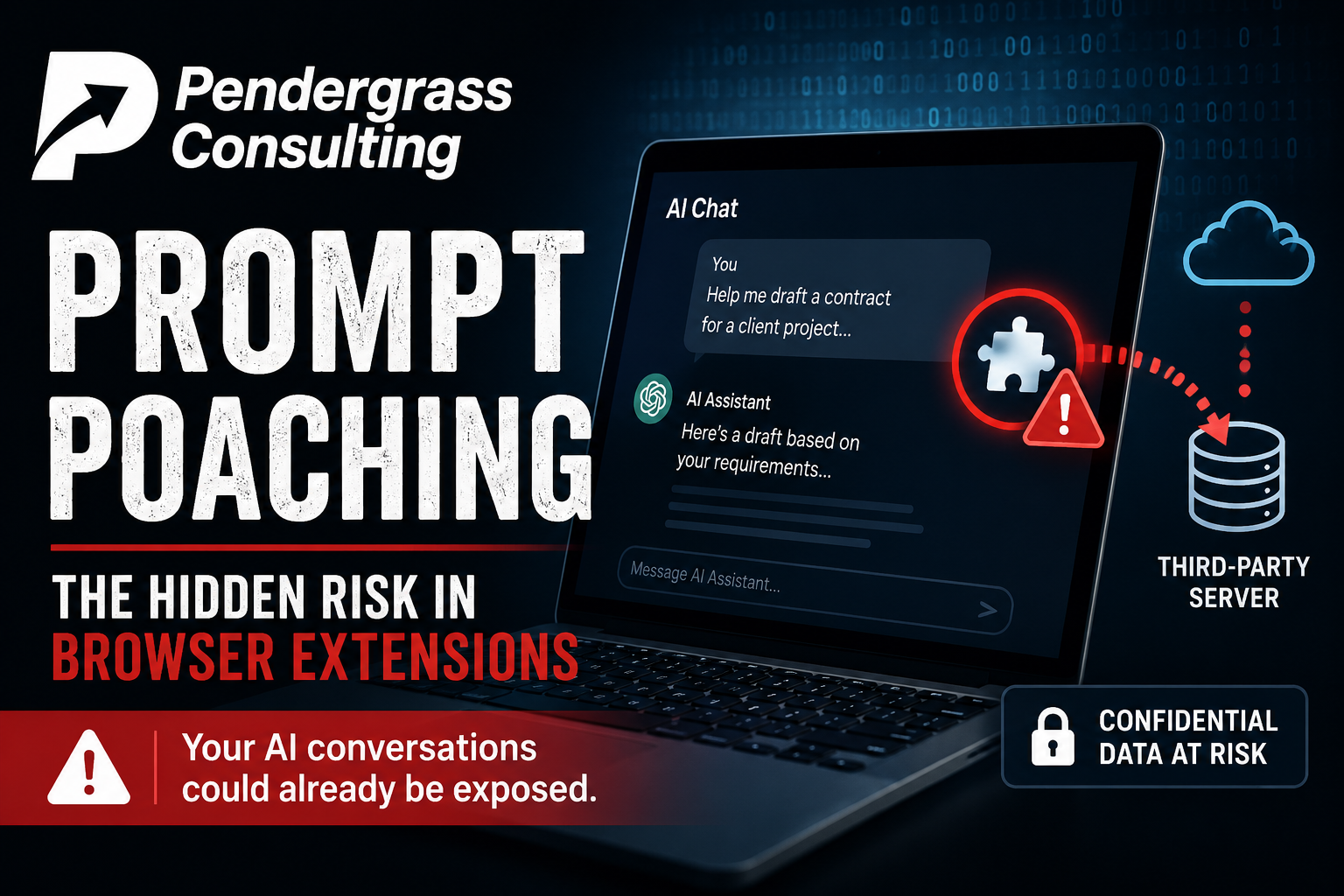
Security researchers have given the technique a name. They call it Prompt Poaching. And it’s already happening at a scale that should change how every small business thinks about what’s installed on their team’s computers.
What’s Actually Happening
Here’s the chain of disclosures, in order:
- December 2025 – Koi Security identified that Urban VPN Proxy, a Chrome and Edge extension with millions of users and a 4.7-star rating, had been silently collecting every prompt and response users typed into ten major AI platforms – ChatGPT, Claude, Gemini, Microsoft Copilot, Perplexity, DeepSeek, Grok, Meta AI, and others – since a July 2025 update. The captured data was packaged and sent to a data broker company called BiScience, which sells it through advertising products. Koi later identified seven sister extensions from the same publisher doing the same thing, bringing the total to roughly 8 million affected users.
- December 2025 / January 2026 – OX Security uncovered two Chrome extensions impersonating a legitimate AI sidebar tool called AITOPIA. Combined user base: 900,000 people. One of the malicious extensions carried Google’s “Featured” badge – the highest trust signal Google gives to any extension in its store. Both extensions exfiltrated complete ChatGPT and DeepSeek conversations, plus URLs from every browser tab, to attacker-controlled servers every 30 minutes.
- December 2025 – Secure Annex documented that two well-known, legitimate extensions had quietly added the same capability. Similarweb (1 million users) added the ability to monitor AI conversations in May 2025 and updated its privacy policy on December 30, 2025 to disclose that it now collects “AI Inputs and Outputs” – including prompts, responses, and any uploaded files (text, images, videos, CSVs). Stayfocusd from Sensor Tower (600,000 users) is doing the same. Both are still in the Chrome Web Store. Both still carry trust signals.
- March 2026 – Microsoft Defender publicly confirmed the campaign in a blog post, noting that telemetry from more than 20,000 enterprise customers showed users actively interacting with AI tools through these extensions – meaning company data, internal workflows, proprietary code, and confidential discussions were potentially flowing out of those organizations every day.
The technique works the same way across all of these cases. The extension requests broad browser permissions – usually framed as “anonymous analytics” or “improving the experience.” Once installed, it sits idle until the user opens a tab to ChatGPT, Claude, Gemini, or another AI tool. At that point, the extension reads the conversation directly from the page, extracts both the user’s prompts and the AI’s responses, and uploads them to an external server. The user has no idea any of this is happening, because the extension is doing exactly what it advertised – and the data collection is buried in a privacy policy nobody read.
Why This Is Different from “Normal” Data Collection
Browser extensions selling browsing data is an old story. We covered the LayerX Security report on this last month, where 80+ Chrome extensions were found to be legally selling user browsing data to third parties.
What makes Prompt Poaching different – and far more dangerous to a small business – is what people put into AI chats versus what they type into a regular website.
Think about what your team uses ChatGPT or Claude for. Things like:
- “Help me draft a contract for [actual client name] for [actual project details].”
- “Summarize this customer email and suggest a response.” Followed by a paste of the entire email, including the customer’s full name, complaint, and contact information.
- “Review this code” with a paste of proprietary source code, API keys, internal database structures, and security tokens.
- “Help me prepare for a meeting about [confidential business strategy].”
- “Write a memo to staff about the [layoffs, salary changes, vendor switch, lawsuit, regulatory issue] we discussed.”
- “Analyze our financials” with a CSV paste of revenue, expenses, and customer data.
Every one of those prompts contains exactly the kind of confidential information your business is supposed to protect. And every one of them is being captured if a Prompt Poaching extension is installed on the browser where it was typed.
It gets worse. The captured data isn’t just “prompts your team typed.” It includes the AI’s responses too – which often contain summaries, analysis, and conclusions based on the confidential data you fed in. So even if you only typed a question, the AI’s answer can leak the underlying details by reasoning about them in its response.
The “Featured Badge” Problem
The most uncomfortable part of all of this is what it says about the trust signals we’ve been taught to rely on.
Multiple Prompt Poaching extensions carried Google’s “Featured” badge – the same badge Google uses to tell users “this extension is trustworthy and recommended.” Multiple Prompt Poaching extensions had 4.7-star ratings from millions of users. Multiple Prompt Poaching extensions came from publishers with legitimate businesses (Similarweb is a publicly traded web analytics company, Sensor Tower is a major mobile-app intelligence firm).
The signals we’ve been telling employees to look for – high ratings, official store presence, recognizable brand names – do not work for this class of risk. The malicious behavior isn’t being added by some fly-by-night developer in a hurry. It’s being added by established companies that have figured out AI conversations are a goldmine of valuable data they can monetize – and as long as they bury the disclosure in a privacy policy, the practice is technically legal.
What This Means for Small Business Owners in the Triangle
If you run a small business in Raleigh, Cary, Selma, or anywhere else in the Research Triangle, and your team uses AI tools through a web browser – you need to take this seriously.
Picture this: your accountant pastes a year of client tax data into ChatGPT to ask for help spotting anomalies. Your marketing person pastes a confidential product launch plan into Claude to refine the messaging. Your developer pastes proprietary source code into Copilot to debug a problem. Your office manager pastes a draft customer complaint response into Gemini to soften the tone.
If any of those people has a Prompt Poaching extension installed on the browser where they’re typing – and Microsoft Defender just confirmed this is happening across 20,000+ enterprise environments – every one of those conversations is potentially flowing out of your business and into a data broker’s database, where it’s being sold to whoever wants to pay for it.
The risk extends in directions most owners haven’t thought about:
- Competitors can buy your data through legitimate marketing analytics products. They learn what you’re working on, what you’re pricing, what your strategy is, and which customers you’re chasing.
- Industry data brokers can resell your prompts to anyone in your sector – including the companies you compete with for clients.
- Threat actors who buy or breach the data brokers get a goldmine of personalized information for highly targeted phishing and social engineering attacks against you and your customers.
- Compliance issues become real if your business handles regulated data (HIPAA for medical, attorney-client privilege for legal, financial data for accounting). You may have just leaked client data to a third party in a way that triggers notification requirements.
What Your Team Needs to Know – Right Now
This is the kind of risk that’s invisible until someone explains it. Most employees do not know that an extension with a Google Featured badge can be capturing their AI conversations. Most employees do not understand the difference between using ChatGPT in a browser tab and using a third-party “AI sidebar” extension. Most employees have never been told that data they type into AI tools at work belongs to the business and needs to be treated as confidential.
That’s a training problem. And it’s the easiest, cheapest, highest-leverage fix in this entire story. An hour of focused training for your team this month will save you from a category of data leak that no firewall, antivirus, or email filter can catch.
Our security awareness training program for small businesses across the Triangle includes coverage of exactly this issue:
- How Prompt Poaching works, and what extensions to remove immediately
- What kinds of information should never be pasted into a web-based AI tool, and what alternatives exist for handling sensitive data
- How to evaluate browser extension trustworthiness beyond ratings and badges
- What an extension policy looks like for a small business, and how to enforce it
- What to do if an employee thinks they may have leaked something they shouldn’t have
What to Do This Week
- Audit what’s installed. Have every employee open Chrome (or Edge), click the extensions icon (puzzle piece), and list every extension installed on their work browser. Most teams will be surprised at how many are there.
- Remove the known offenders immediately. Urban VPN Proxy, the AITOPIA-impersonator extensions, and any “AI sidebar” extension that wasn’t published by the actual AI provider (OpenAI, Anthropic, Google, Microsoft, etc.). When in doubt, remove it – the inconvenience is small, the risk is large.
- Review the trusted extensions you’re keeping. Check the privacy policy of each one. If it mentions “AI Inputs and Outputs,” “AI tool usage,” or anything similar in its data-collection section, that extension is doing Prompt Poaching – even if it’s a legitimate company. Decide whether the trade is worth it.
- Set an extension policy. No new browser extensions installed without IT approval. This is standard practice in any business that handles client data, financial information, or anything regulated.
- Use Chrome’s enterprise extension controls. Chrome has built-in tools that let you block extensions company-wide and approve only a vetted list. Edge and Firefox have equivalent controls. Most small businesses never enable these because they don’t know they exist.
- Use AI tools through their official channels when possible. Going directly to chatgpt.com or claude.ai in a clean browser tab is dramatically safer than using a third-party “AI helper” extension that promises a more convenient interface.
The Bigger Picture
Prompt Poaching is the leading edge of a category of risk that didn’t exist two years ago. AI tools are now woven into how every small business actually does work – drafting emails, summarizing meetings, analyzing data, writing code, planning campaigns. That makes the conversations your team has with AI tools among the most valuable data your business produces. And right now, that data is flowing through a piece of software (the browser, with whatever extensions are installed in it) that most owners have never thought of as a security risk.
The fix isn’t to stop using AI – it’s enormously productive when used carefully. The fix is to treat the browser the same way you treat any other piece of business infrastructure: know what’s running on it, control what gets installed, and train the people who use it.
How Pendergrass Consulting Helps
This is exactly the kind of risk that we built our managed cybersecurity service to address. As part of our work with small business clients across the Triangle:
- We audit browser extensions across your team’s devices and remove anything that’s selling your data or capturing AI conversations.
- We set up enterprise extension policies in Chrome and Edge so unauthorized extensions can’t be installed in the first place.
- We train employees on what’s safe to use, what to watch for, and what to do if something feels off – including current threats like Prompt Poaching.
- We monitor for new disclosures as they come out. When the next batch of malicious extensions gets identified, we know which ones to remove from your team’s machines before they cause damage.
- We do quarterly reviews of your full environment – browsers, servers, email, backups, accounts, vendors, employee training – so you have one consistent picture of where you stand and what’s changed.
If you’ve never had a real conversation about what’s running on your team’s computers, what data is flowing out of your business through tools you didn’t realize were collecting it, or where your gaps are – that’s exactly what we cover in a comprehensive small business environment review. There’s no charge for the first conversation and no commitment beyond it.
Pendergrass Consulting
Phone: 252-432-3325
Email: Sales@PendergrassConsulting.com
110 S. Massey St., Suite 201, Selma, NC 27576
Pendergrass Consulting is a full-service IT firm based in Selma, NC, serving small businesses across the Research Triangle, Raleigh, Cary, Wake County, Johnston County, and nationally for web, hosting, email, cloud backup, cybersecurity, and digital marketing services.