A Quick Scan Could Cost You Everything
You see them everywhere now—on restaurant tables, parking meters, event posters, and storefront windows. QR codes have become so commonplace that most of us don’t think twice before pulling out our phones and scanning. But that split-second decision could expose your personal information, drain your bank account, or compromise your entire digital life.
Before you scan that next QR code in a public place, take a moment to understand the growing threat that cybersecurity professionals call “quishing”—and learn how to protect yourself and your business.
What Is Quishing?
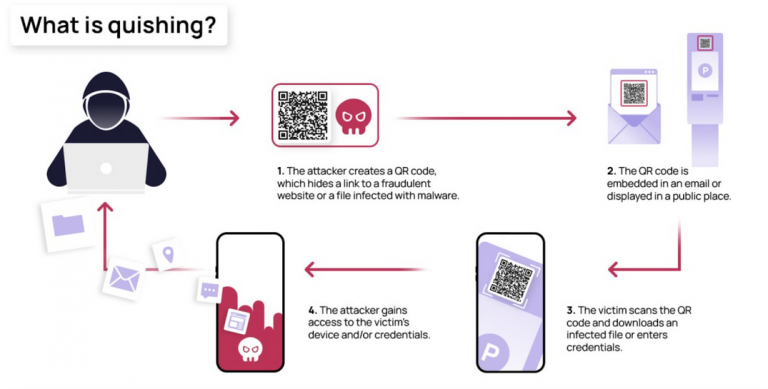
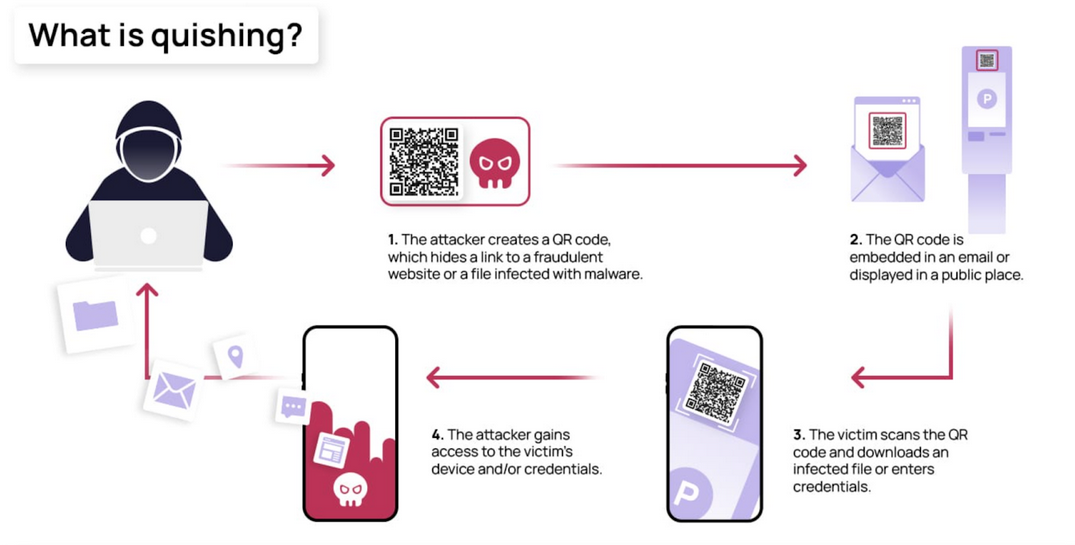
Quishing (QR code phishing) is a cyberattack where criminals replace legitimate QR codes with malicious ones or create fake codes that direct victims to fraudulent websites. Unlike traditional phishing emails that many people have learned to recognize, QR codes hide their destination until after you scan them—making them a perfect tool for deception.
The attack is deceptively simple: a criminal places a sticker with a malicious QR code over a legitimate one, or posts fake codes in high-traffic areas. When you scan it, you’re taken to a convincing fake website designed to steal your login credentials, payment information, or personal data.
Real-World Examples That Should Concern You
Parking Meter Scams: Cities across the United States have reported fake QR codes placed on parking meters and pay stations. Drivers thinking they’re paying for parking are actually entering their credit card information into a criminal’s fake payment portal. By the time they realize the scam—often through a parking ticket or fraudulent charges—the damage is done.
Restaurant Table Tent Fraud: Criminals have been known to place fake QR codes over legitimate menu codes at restaurants. Instead of viewing the menu, diners are directed to phishing sites that mimic popular payment apps or restaurant loyalty programs.
Event and Concert Scams: Fake QR codes on event posters promise exclusive content, free tickets, or VIP upgrades. Victims who scan them may unknowingly download malware or provide personal information to criminals.
Package Delivery Schemes: Some scammers leave fake “missed delivery” notices with QR codes, claiming you need to scan to reschedule. The code leads to a site that harvests your personal information or installs malicious software on your device.
Why QR Code Attacks Are So Effective
QR codes exploit several psychological and technical vulnerabilities that make them particularly dangerous:
Invisible Destinations: Unlike a suspicious-looking email link, you cannot see where a QR code will take you until after you’ve scanned it. By then, it may be too late.
Trust by Association: When a QR code appears in a seemingly legitimate context—a city parking meter, a well-known restaurant, or an official-looking poster—we naturally assume it’s safe.
Mobile Vulnerability: Phones often have fewer security protections than computers, and the smaller screen makes it harder to notice suspicious URLs or security warnings.
Speed Over Caution: QR codes are designed for convenience and quick access. That urgency works against careful evaluation of potential risks.
How to Protect Yourself: Before You Scan
Inspect the Physical Code: Look for signs of tampering. Is there a sticker placed over another code? Does the code look hastily printed or out of place? Criminals often use adhesive labels to cover legitimate codes with their malicious versions.
Consider the Context: Ask yourself if the QR code makes sense in its location. A code on an official city parking meter is more trustworthy than one on a random flyer taped to a light pole.
Use Your Phone’s Preview Feature: Most modern smartphones will show you the URL before opening it. Take that extra second to read the web address. Look for misspellings, unusual domains, or URLs that don’t match the expected destination.
Verify Through Official Channels: If a QR code claims to link to a business or service, consider going directly to that company’s official website or app instead of scanning.
Keep Your Phone Updated: Ensure your device’s operating system and security software are current. Updates often include protections against newly discovered threats.
What Businesses Need to Know
If your business uses QR codes—for menus, payments, promotions, or customer engagement—you have a responsibility to protect your customers and your reputation.
Regularly Inspect Your Codes: Make it part of your routine to check that your QR codes haven’t been tampered with or covered by malicious stickers.
Use Secure, Branded Short Links: When possible, use QR codes that resolve to clearly branded URLs that customers can easily verify.
Educate Your Staff: Train employees to recognize signs of QR code tampering and to report suspicious activity immediately.
Consider Dynamic QR Codes: These allow you to change the destination URL without reprinting the code, making it easier to respond if a compromise is detected.
Communicate With Customers: Let your customers know you take their security seriously. A simple sign explaining your legitimate QR code usage can help them identify fakes.
When Things Go Wrong: What to Do If You’ve Been Scammed
If you suspect you’ve scanned a malicious QR code, act quickly:
Disconnect from the Internet: If you downloaded anything suspicious, disconnect your device from WiFi and cellular data to prevent further data transmission.
Change Your Passwords: If you entered any login credentials, change those passwords immediately—and any other accounts that use the same password.
Monitor Your Accounts: Watch your bank accounts and credit cards closely for unauthorized transactions. Consider placing a fraud alert with the credit bureaus.
Report the Incident: Notify local law enforcement, report the scam to the FTC at reportfraud.ftc.gov, and alert the business whose QR code may have been compromised.
Scan for Malware: Run a complete security scan on your device to check for any malicious software that may have been installed.
The Bottom Line
QR codes aren’t going away—they’re too convenient for businesses and consumers alike. But that convenience comes with real risks that require real awareness.
The next time you encounter a QR code in a public place, take five seconds to think before you scan. Examine the code physically, preview the URL, and trust your instincts if something feels off. Those few seconds of caution could save you hours of dealing with fraud, identity theft, or compromised accounts.
Need Help Securing Your Business?
At Pendergrass Consulting, we help businesses stay ahead of evolving cyber threats. From security assessments to employee training, we provide the local, hands-on support you need to protect your business and your customers.
Contact us today to discuss how we can help secure your digital presence—before the scammers find their way in.